👩💻 Developer Overview
This guide explains how to set up the LogLife development environment and run the full stack locally.
🏗️ System Architecture
LogLife is built with a microservices architecture to ensure scalability and separation of concerns:
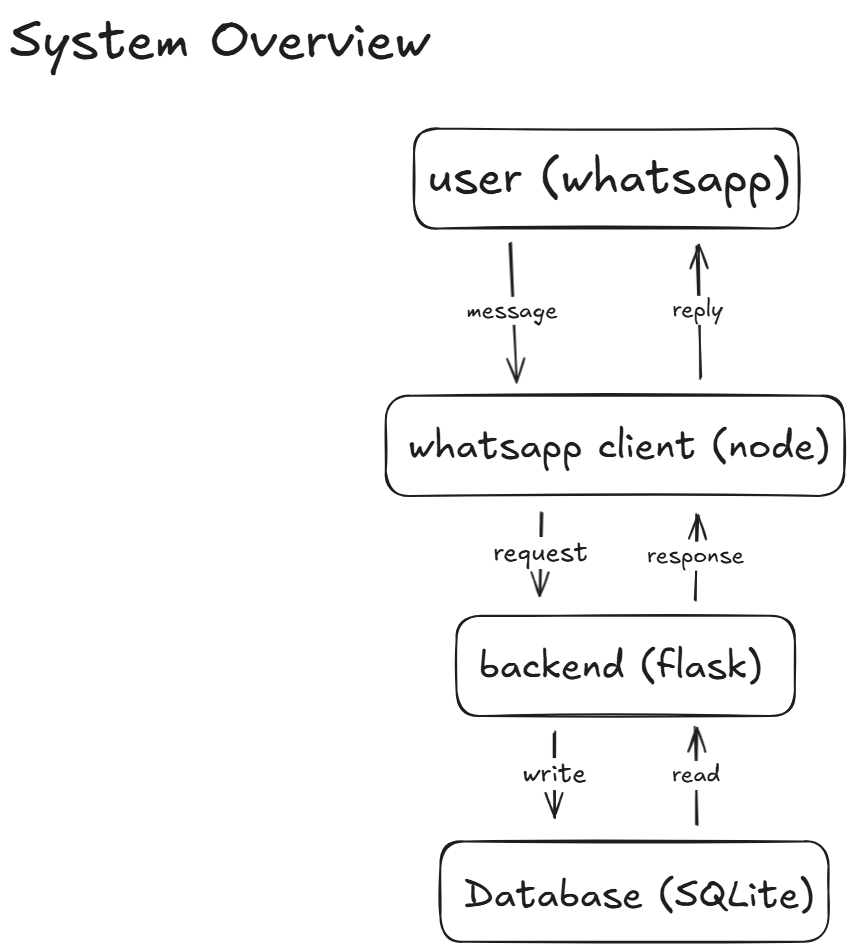
- Backend: Python (Flask) handling business logic, database operations (SQLite), and AI integration.
- WhatsApp Client: Node.js service using
whatsapp-web.jsto interface with the WhatsApp network. - AI Services: Integration with AssemblyAI (transcription) and OpenAI (summarization).
🔑 Key Modules
Here is a breakdown of the critical files in the codebase, organized by their function.
Core Framework
The reusable components for building any WhatsApp bot.
Location: src/loglife/core/
| File | Description |
|---|---|
startup.py |
Bootstrap. Initializes DB, logging, and background workers. Registers Flask blueprints. |
messaging.py |
Engine. Manages the Producer-Consumer queues (inbound_queue, outbound_queue) and starts the worker threads. |
transports.py |
Adapters. Handles the specific protocols for sending messages (WhatsApp API requests vs Emulator SSE). |
interface.py |
Public API. Exposes the simplified helpers (recv_msg, send_msg, init) for developers. |
routes/webhook/ |
Entrypoint. Receives HTTP POST requests from the WhatsApp client or Emulator and enqueues them. |
routes/emulator/ |
Dev Tools. Serves the web-based chat emulator for local testing. |
Journaling App
The specific business logic for the LogLife product.
Location: src/loglife/app/
| File | Description |
|---|---|
Logic (logic/) |
|
router.py |
Brain. The central dispatcher. Decides if a message is Text, Audio, or VCard and calls the right processor. |
text/handlers.py |
Commands. Contains the state machine for text commands like "add goal", "rate", "set reminder". |
text/processor.py |
NLP. Parses natural language text to extract intent and entities (e.g. parsing "remind me at 9am"). |
audio/processor.py |
Pipeline. Orchestrates the audio flow: Download -> Transcribe -> Summarize -> Store. |
audio/transcribe_audio.py |
ASR. Client for AssemblyAI API. |
audio/journaling/ |
AI. Specific prompts and logic for summarizing daily journals using OpenAI. |
timezone.py |
Utils. Helper functions for handling user timezones based on phone numbers. |
Services (services/) |
|
reminder/worker.py |
Scheduler. Daemon thread that wakes up every 60s to check for due reminders in the DB. |
devtools/sqlite_ui.py |
DB Browser. Daemon thread that runs sqlite_web to let you inspect the database in a browser. |
Database (db/) |
|
client.py |
Connection. Thread-safe database connection management (Singleton pattern). |
schema.sql |
DDL. Raw SQL schema for creating tables. |
tables/*.py |
Models. Peewee-style ORM classes for User, Goal, Rating, AudioJournal. |
🛠️ Tech Stack
- Backend: Python 3.11+, Flask, SQLite
- Client: Node.js, whatsapp-web.js, Express
- AI: OpenAI GPT-4 (or similar), AssemblyAI
- Tools:
uv(Python package manager),pytest,ruff
🏁 Getting Started
Follow these steps to set up LogLife on your local machine.
Prerequisites
- Python 3.11 or higher
- Node.js 16 or higher
- A WhatsApp account (to act as the bot)
- API Keys for OpenAI and AssemblyAI
Installation
-
Clone the repository:
git clone https://github.com/jmoraispk/life-bot.git cd loglife -
Set up the Backend:
# Install dependencies and run the backend uv run src/loglife/main.py -
Set up the WhatsApp Client: Open a new terminal window:
cd whatsapp-client npm install node index.js -
Connect WhatsApp:
- The Node.js client will generate a QR code in the terminal.
- Open WhatsApp on your phone (Linked Devices) and scan the QR code.
🧪 Running Tests
To ensure everything is working correctly, run the backend tests:
uv run pytest tests